
HRH Princess Michael of Kent, David Cameron MP and The National Portrait Gallery have all got behind a new photographic promotion to raise much-needed funds for the Variety Club of Great Britain, which celebrates its 60th Anniversary this year.
Author: David Kilpatrick
-
Japan issues forecast for next 3 years' sales
The Japanese camera and photo product manufacturing association CIPA has issued a press release PDF, containing a table of predicted figures, relating to 2009-2011 projections. Here we reproduce the text and the table (as a JPEG).
(more…) -
Colour Confidence expands into Europe
Birmingham, UK, 22nd January 2009 – Colour Confidence, Europe’s leading independent colour management specialist, has today announced the successful completion of a deal to purchase grafipress GmbH – a leading supplier to the graphics market and key Pantone distributor in Germany.
-
UK prices – a steep climb ahead
This is a very short post. I’ve been talking to a few directors of importing companies in the UK over the last few days, as people return from holidays which many in the photo industry take in early January. The word is this: while prices right now, and at Focus on Imaging 2009 Feb 22-25 show, may remain low and even be cut to liquidate existing stock, the rises which will hit us in mid-2009 will knock the wind out of you.
(more…) -
Sekonic's camera calibration
The Sekonic Digitalmaster L-758D meter offers the solution to variable ISO/EI ratings, and apparent sensitivity and contrast curves variations found in DSLRs. With a USB interface to link it up to a PC/Mac calibration program, the L-758D can remember three different cameras, two types of lighting (ambient or flash) and two measuring methods (incident or reflected) plus a range of ISO values for each of the cameras. There are twelve basic ‘profiles’ that can be stored, and within each profile a range from ISO 3 to ISO 8000.
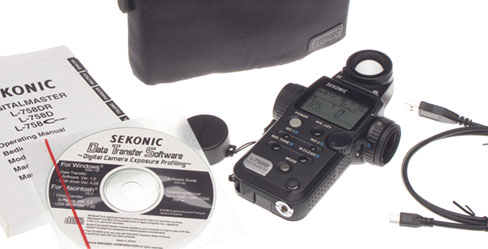
The three cameras can include settings on a single camera such as Landscape+sRGB+High Contrast, or Portrait+AdobeRGB+Low Saturation+Low Contrast. More likely, they will be three different generations or even different makes of digital SLR, as many studios keep their last models when buying new ones. They can equally well be films used in a particular film camera, though you need a scanner or a densitometer for calibrating film.
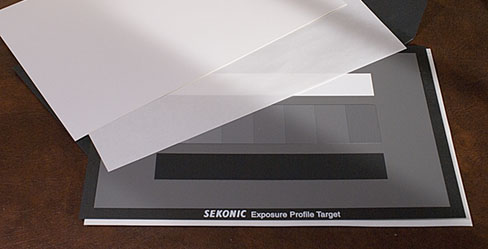
You might think a meter costing over £300 and coming with a USB cable and a program to do the calibration would include the necessary calibration target. But it’s incapable of actually doing the calibration until you spend another £99.99 on a special A4 grey scale card. Since this report was written, a new more accurate target card has been introduced.
My sample test target arrived packed in a carton large enough to contain a camera. It is quite fragile, and obviously hand-made using special papers and perhaps a type of inkjet printing for the black patches. You could not just shove this in a camera bag and use it as a grey card. It should be kept in its envelope and stored away from light, like an archival print.
Sekonic Digitalmaster L-758D basic functions
The Sekonic appeared to agree with power adjustments made to my Elinchrom flash units, which claim a 1/10th of a stop accuracy.
I found it to agree with my Minolta Flashmeter IV (which can be user calibrated with a small potentiometer in the back, but only for overall sensitivity). The L-758D should never need to go back to base as a default calibration can be programmed in to it, and this can cope with non-linear responses.
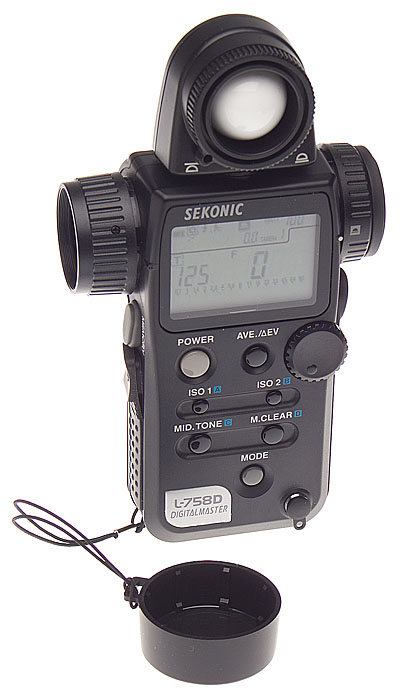
The L-758D will measure flash versus ambient, compare light source contrasts, or compare incident and digital much like any other modern digital meter. You can take up to nine spot or local measurements, pressing the M memory button after each one, then pressing the Average button for a calculated average exposure. Contrast (they recommend you turn each light off and only measure one at a time) is shown in EV values.
The reflected light metering via a semi-spot type viewfinder replaces any other type of reflected reading. Unlike the Gossen Spotmaster F you don’t get information shown in the finder, you just use the sighting to make the reading and must then examine the Sekonic’s LCD.
I found the L-758D to be large, complex and to have too many simultaneous potential functions and too much going on the LCD display with too-small graphics and symbols. It is no doubt versatile but I would be happy with one of the simpler models in the range for the routine metering I need to do.
Sekonic Digitalmaster L-758D calibration
If you shoot raw and habitually use a program like Adobe Camera Raw with auto adjustments set you can not use the meter calibration function. It only works if a fixed conversion is used for all files, or you shoot in-camera JPEGs and do not change the contrast or colour space and scene type settings.
The plain 18% grey back of the test card is ideal for white balancing and spot metering. The front side has an 18% grey field plus a central array of seven grey patches in 1/6th stop increments, plus and minus 0.5EV either side of 18% grey. Above this is a white strip 2.33 EV brighter than 18%, and below it a black strip 2.33EV darker.
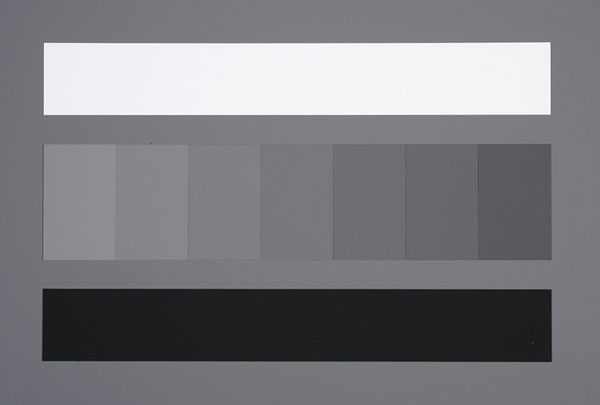
Sekonic Digitalmaster test file from the Konica Minolta Dynax 5D While Sekonic issue LAB values and densities for their £99.99 card (it goes from 3.6% to 90.7% reflectance, densities 0.04 to 1.44 LogD), they disclaim accuracy and say ‘not guaranteed as the performance of exposure profile target’.
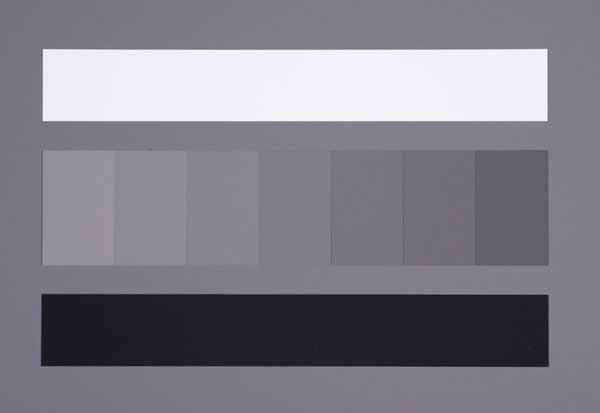
Test file from the Sony Alpha 100 under identical lighting and lens conditions In the CD-only user instructions you learn that you can equally well use a Kodak Greyscale and enter the data manually. The software, however, operates only with the Sekonic target for automatic entry. Even this is mainly manual; you must use Photoshop to read off the RGB values from each patch. It will not read a JPEG in the way that camera ICC profiling software reads a target image.
Light and lens problems
The recommendation is 45° copy lighting, but the total range of exposures needed to calibrate one DSLR fully is too great for most flash systems at such close range. You need to give plus three to minus three stops either side of a metered exposure, at each ISO speed you want to measure. You should also compare incident and reflected readings, and make tests using both flash and ambient light.
Even at ISO 400 my Elinchrom 300S heads, turned down to 1/16th power, need a neutral density filter fitting to make a complete set of exposures with ISO 400 and a lens which stops down to ƒ32, when placed five feet either side of the target.
The biggest speed deviations with DSLRs occur at even higher ISOs. Doing a full calibration is going to be difficult – I did not attempt it because I’m not keeping the meter, and it would have occupied a full half-day or maybe most of a day. But I would have needed some special type of light source to calibrate ISO 1600 or 3200.
It was useful to find out that two of our DSLRs used with twin wireless flash heads and auto exposure agreed with the Sekonic to within 1/10th of a stop, and one gave 1/3rd of a stop overexposure.
For quick operation, without a camera calibration for dynamic range and clipping point data, you don’t need the ±3 stops business. You don’t really need the Sekonic card, a good 18% grey card will do fine. Take a shot at each ISO setting, as measured by the Sekonic meter, using a medium lens aperture (least likely to have errors) and medium flashpower if possible (ditto). Open the JPEG in Photoshop, check the Green channel RGB levels in ‘Info’ and this should be within the range 116 to 120 (118 is the target figure). The 1/6th stop steps either side of G=118 are roughly in intervals of 8 on the lighter side and 7 on the darker side but cameras do not have linear response, and Sekonic only work within +/-2 units of the 256 value G scale.
Once you have completed all your entries, the meter is connected to the computer by its supplied USB cable, and the program recognises its presence. You can then upload the new calibration to the meter. Each calibration is recalled using a memory menu on the L-758D, and you must of course remember which storage register applies to which camera.
If you think any of this is slightly complicated, don’t buy the Sekonic L-758D for its programmable camera customisation. Buy it for its excellent performance as a multifunction flash/ambient meter with wireless Pocket Wizard compatible triggering upgrade option, and all the features you’ll find in the best meters of the last decade rolled into one.
The Sekonic L-758D meter is imported to UK by JP Distribution, and has a retail price (without the calibration target or the Pocket Wizard adaptor) of £398.99 including VAT.
– David Kilpatrick FBIPP Hon FMPA
-
One Vision takes over Leach photo lab
One Vision Imaging, the Midlands leading professional photographic laboratory, has just announced its latest acquisition, the Photography division of the highly acclaimed Leach Colour Laboratory.
-
Canon EOS 5D MkII, Nikon D3X, and Sony Alpha 900 compared
This set of full size shots was taken with the still life left set up, because the Nikon and Canon cameras were not here at the same time. The report originally appeared in December 2008 on photoclubalpha. It compares the A900, 5DMkII and D3X using the converters supplied by the makers – Image Data Converter SR2, Digital Photo Professional, and Capture NX2. Each small image in the article can be clicked to open a Level 10 quality full size JPEG – beware, the largest is over 13MB of data.
-
Exmor 'R' debuts in Handycams
Sony’s new back-illuminated CMOS sensor design makes its first appearance – along with technology borrowed from the Alpha system – in a new HD Handycam video model, the HDR-XR520VE/500VE. Hopefully presaging future DSLR developments, the range also includes models with built-in GPS tracking to record the location of shots as you film.
(more…) -
Expodisc white balance with the KM Dynax 5D
The custom white balance function on the Konica Minolta Dynax 5D could not be quicker to use; turn the left hand top dial to the custom symbol, press the button in the centre of the dial, press the shutter after aiming the camera at your white or grey target. Custom WB is now set until changed with a new reading, or returned to fixed or Auto WB.
(more…) -
Sony Alpha 900 and Nikon D3X raw file noise comparison
Like Mike Johnston writing in The On-Line Photographer, I’m aware that any attempt to line up one or more cameras and show comparison images or make judgements is on to a loser from the start. And any webmaster who puts an external link in the first half dozen words of a new post is losing the plot too! But here, for what it’s worth, is the first line-up of results processed using the same software from A900 and D3X uncompressed raw files converted without sharpening or noise reduction.